

Accounts payable and financial automation

Accounts payable automation captures supplier invoices from email or scans and reads and codes them. It checks them against purchase orders and sends them into your accounting software for approval. We set it up around the system you already use, such as QuickBooks, Xero, Zoho Books or Tally. Your team still approves every payment.

Plan. Build. Deploy. Live in 90 days.

Your first automation is live within 30 days, or we keep working free until it is.

If your first automation isn’t live within 30 days, you get your money back. See the terms

Clients of Tailwebs

  • Crime and Punishment
  • Kaipo
  • MOSIP
  • Raja Fashions

What can financial automation do for your business?

Example
Bill from Apex PackagingRead by AI
Read from
Email PDF
Amount
$1,240.00
Account
Packaging costs
In
QuickBooks
✓ Posted as a bill, awaiting approval

Supplier invoices posted

Invoices arriving as emails, PDFs or photos are read and posted as bills in QuickBooks, Xero, Sage, Zoho Books or Tally.

Example
INV-8817 vs PO-5520Read by AI
PO amount
₹72,000
Invoice
₹75,600
Difference
₹3,600
Received
Matched
! Mismatch flagged to accounts

Purchase order matching

Two-way or three-way matching against purchase orders and receipts, with mismatches flagged.

Example
Slack#approvals

AutomationBill #B-3302 from Orbit Courier, $640.00, needs your approval. Payment release stays with you.

ApproveReview

Approval routing

Approvals routed by amount or department, by email, Slack or WhatsApp, while releasing payment stays with you.

Everything we automate here

  • Supplier invoices from email, PDF or photos read and posted as bills in QuickBooks, Xero, Sage, Zoho Books or Tally
  • Two-way or three-way matching against purchase orders and receipts in NetSuite, Zoho Books or the client's ERP, with mismatches flagged
  • Approval routing by amount or department by email, Slack or WhatsApp, with payment release kept with the client
  • Duplicate-invoice and unusual-amount checks before posting
  • Bank statement lines matched to invoices and payments
  • Overdue invoice reminders with a payment link (Stripe or Razorpay), stopped once paid
  • A daily cash, payables and receivables summary for the owner or finance lead
  • Month-end reports compiled from the accounting system

Will it work with the tools we already use?

Yes. We connect it to your existing systems, so data moves between them on its own and nobody copies it by hand.

Financial automationby Tailwebs
  • QuickBooks
  • Xero
  • Tally
  • Zoho
  • Sage
  • Stripe

How long does it take to go live?

Your first automation is live in month one, and the rest are live, tested and handed over by day 90. Here is what you receive each month.

How the 90 days work
  1. 30Plan

    Audit your workflows, pick the automations with the best payback and launch the first one.

    Automation roadmapSample1 · Lead replies on WhatsAppLive2 · Invoices into accountsDay 31–603 · Weekly owner reportDay 31–60
  2. 60Build

    Build and connect the rest to your tools, and test every flow with real data.

    Test run with real dataSampleInvoice read and matchedPassedBill posted for approvalPassedMismatch flagged to a personPassed
  3. 90Deploy

    Go live, train your team and set up tracking.

    Before-and-after reportSampleBefore[00] hrs a weekAfter[00] hrs a weekFigures come from your own data at day 90.

Work we have shipped

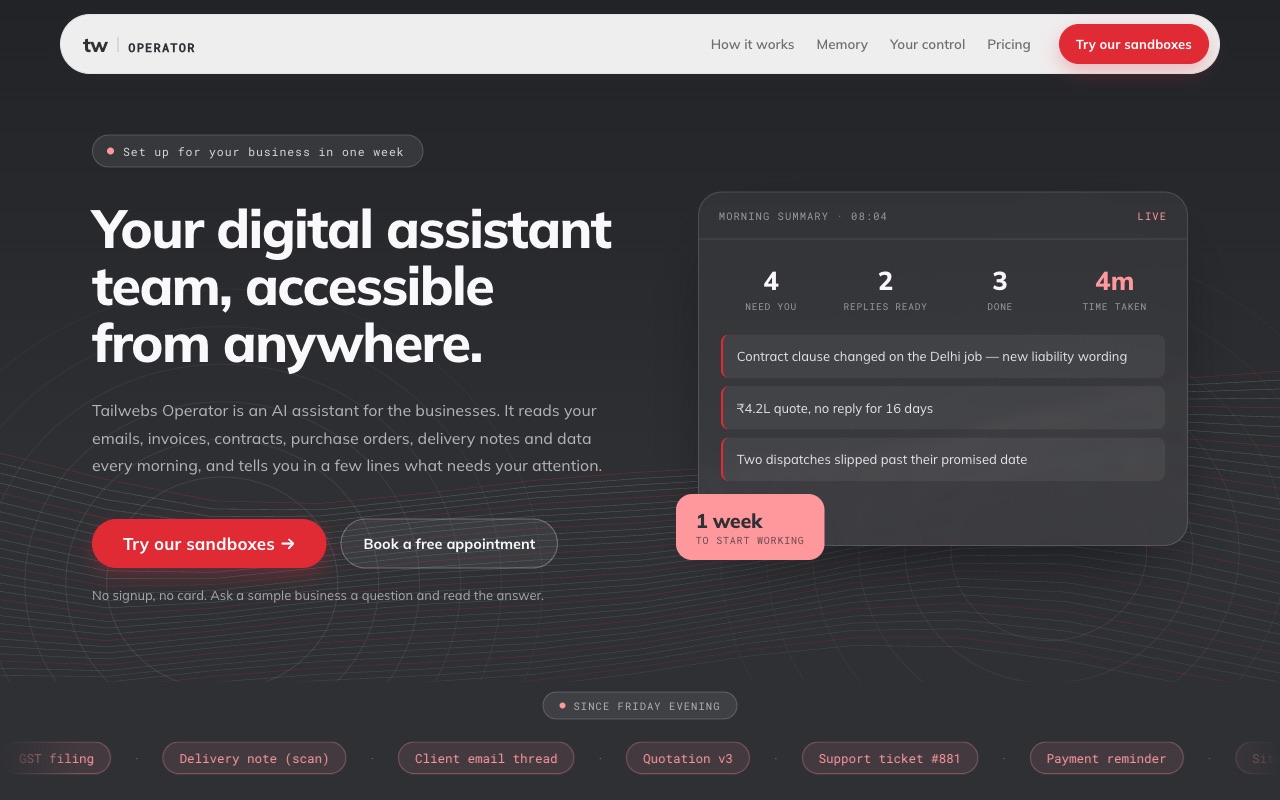
operator.tailwebs.com
Tailwebs Operator website showing a morning summary of what needs the owner's attention
Tailwebs product

Tailwebs Operator

An AI operations assistant that reads the day’s documents every morning and reports only what needs attention.

  • Reads emails, invoices, contracts, purchase orders, delivery notes and spreadsheets every morning
  • Reports what changed since yesterday and what needs a decision
  • Per-task rules (Do it, Draft it, Ask me); it cannot send messages or payments itself, and data stays on the business’s own systems
[Result: businesses using it, and in production since]Visit the live siteRead the case study

How much does financial automation cost?

It depends on your volumes and tools, so you get a fixed quote after a 30-minute call. Your accounting software licence and AI usage per document are listed separately in your quote.

Get a quote on WhatsApp
Our workScoped on the call, before any work starts
Fixed quote
Third-party costsListed separately, never marked up
At cost

Questions buyers ask

Which accounting processes can be automated with AI?

Invoice capture, coding, matching against purchase orders, approval routing, payment reminders and bank reconciliation can all be automated. Releasing a payment stays with a person.

Can accounts payable automation integrate with my existing accounting software?

Yes. We build around the accounting system you already run, so bills, approvals and payment status stay in one place. [Accounting systems we have built and tested]

Which accounts payable software is best for small businesses?

Usually the accounting system you already run, with automation built around it. We don't resell software, so we recommend a change only when your current system can't do the job.

What is the typical implementation process for accounts payable automation?

We map how invoices flow today, connect your inbox and accounting system, run the automation alongside your team until the results match, then switch over.

Can AI read scanned, handwritten or photographed invoices?

Yes for clear scans and photos; messy handwriting is less reliable. Any field the AI isn't sure of goes to a person to check before it's posted.

Is automation worth it if I process fewer than 50 invoices a month?

Often not for invoice capture alone. It starts to pay when it also handles approvals, reminders and reconciliation, so tell us your volumes and we'll say honestly whether it's worth it.

Do I still need my accountant if I automate accounting?

Yes. Automation does the data entry and chasing; your accountant still reviews the books, advises you and signs off.

Get a fixed quote for financial automation

Prefer email? hello@tailwebs.com